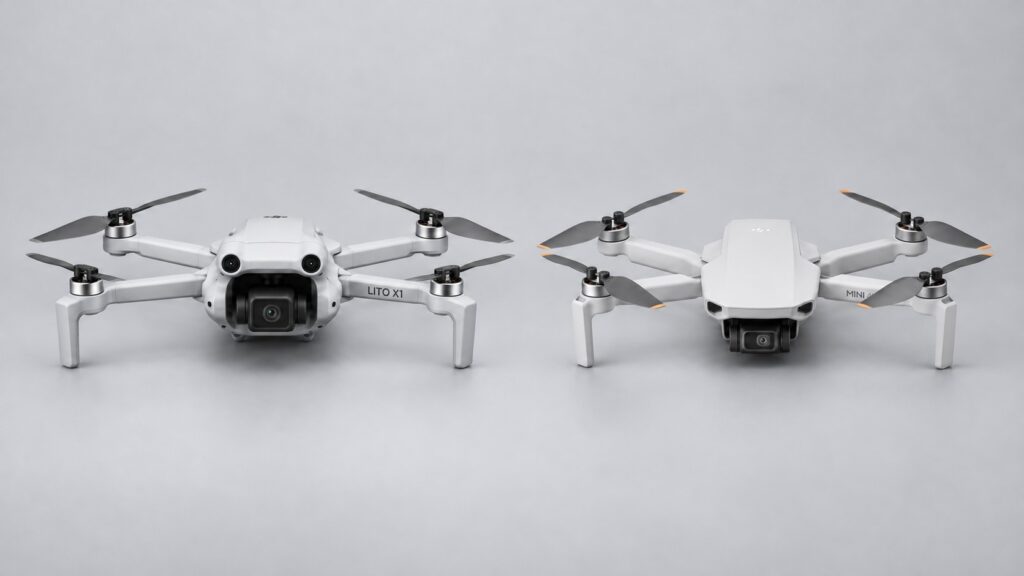
Choose the DJI Lito X1 if you want subject tracking, 4K slow motion or obstacle sensing for regular filming. For daylight photographs and manually flown landscape footage, a healthy Mini 4K is still a useful drone to keep.
DJI’s UK Mini 4K store page showed it as unavailable in the region when checked on 15 October 2026. If you find a retailer or used offer, check the seller, battery condition and included kit before comparing it with a new X1.
For a wider choice of first-drone formats, start with my beginner drone buying guide.
What would justify paying more for the Lito X1?
DJI’s UK store listed the Lito X1 at £369 with an RC-N3 controller and one battery on 15 October 2026. Use that dated price as a reference and compare current complete-kit offers.
Compare complete usable kits. A Mini 4K with three healthy batteries, a hub and a case may suit occasional landscape flying better than replacing it with a single-battery X1. Conversely, a cheap used aircraft becomes less attractive if it needs batteries, a controller or repairs before you can fly.
- Choose X1 for moving subjects: ActiveTrack gives it a capability the Mini 4K lacks.
- Choose X1 for more video options: 4K/60fps HDR, 4K/100fps slow motion and D-Log M expand the recording and editing choices.
- Keep Mini 4K for simple coverage: its three-axis gimbal, 4K/30fps recording and RAW photographs remain useful when you fly and frame the shot yourself.
The camera upgrade is more than the 4K label
The Mini 4K has a 1/2.3-inch 12MP sensor with an f/2.8 lens. X1 moves to a larger 1/1.3-inch sensor, an f/1.7 lens and a 48MP photo option. The larger sensor is an appealing upgrade for more demanding light and cropping. Both save DNG RAW photographs, so you can already work on exposure and colour from the older Mini’s files.
For video, X1 gives you more choice over movement. Mini 4K records up to 4K/30fps; X1 offers normal 4K recording up to 60fps and a separate 100fps slow-motion mode. On a 25fps timeline, 100fps produces quarter-speed action. Select the normal HDR or slow-motion mode to suit the shot.
X1 also offers 10-bit D-Log M for colour grading. This is useful if you deliberately balance colour and exposure across an edit. It adds work if you simply want a ready-to-share clip. Normal colour is the sensible starting point for that use.
Mini 4K records H.264 video, while X1’s 4K files use H.265/HEVC. Try an X1 sample in your editor, especially on an older laptop. Proxy files or transcoding can make demanding footage easier to edit.
Tracking and obstacle sensing change how you plan a shot
Mini 4K’s QuickShots handle preset camera moves, and its downward sensors help with positioning. To follow a moving subject you fly and frame manually: it has neither ActiveTrack nor all-round obstacle avoidance. X1 is the more suitable choice when following subjects is a regular part of your filming.
X1 adds ActiveTrack, omnidirectional vision sensing and forward-facing LiDAR. These help with moving subjects and sideways camera moves. DJI specifies adequate light and textured surfaces for the vision system; leave extra clearance around wires, fine branches, glass and water, which can be hard to detect.
Plan the flight and return route before switching on tracking, leaving room to stop or take over. Open ground with a clear view of the aircraft is a good place to practise. Choose dry conditions with good visibility.
If your usual footage is a slow reveal across open countryside, the Mini’s simpler feature set may already cover the job. X1’s assistance is most valuable when the additional capability solves a recurring limitation.
Budget for the controller, batteries and files
The Mini 4K’s RC-N1C and the X1 standard kit’s RC-N3 both use a phone for the flight display. Check DJI Fly support for your actual phone and the cable you need. The X1 is also sold with the screen-equipped DJI RC 2; that removes the need to mount your phone for routine flying, but costs more.
Price the X1 as a new system, including its compatible controller, batteries, hub, propellers and filters. Check exact compatibility before counting any Mini 4K accessory towards the new kit.
X1’s 42GB of internal storage gives you a useful fallback alongside its microSD slot. Mini 4K relies on its recording card, so check it is fitted and has free space before leaving. Empty X1’s internal storage regularly too. My drone microSD guide explains card speed and capacity; match your choice to the exact drone’s recommended-card list.
Compare X1’s standard and Fly More kits before buying extra batteries individually. Look at the controller, battery count, hub and bag included in each offer.
Keep the Mini 4K, buy X1 or save for something else?
Keep your Mini 4K if it is reliable, your batteries are healthy and you mainly want daylight stills or 4K/25–30fps landscape footage. Practising exposure, camera movement and editing can improve those results without replacing the aircraft.
Buy the X1 if you repeatedly need subject tracking, higher video frame rates or a more capable sensing system, and you can afford a suitable complete kit. On a used Mini 4K offer, check battery condition, aircraft/account binding, included equipment and the seller’s return terms before comparing the price.
Consider the Mini 5 Pro if the real requirement is a rotating vertical camera or a larger one-inch sensor. Buying X1 as a temporary step may cost more overall if those are the features you already know you need. The X1 versus Mini 5 Pro comparison sets out that next spending decision.
Before flying in the UK, check the aircraft’s class label and permitted battery configuration. The CAA requires a Flyer ID for aircraft of 100g or more and an Operator ID for camera drones of 100g or more. Choose standard X1 batteries for an ordinary kit; DJI applies separate UK model/class restrictions to Plus configurations.
Technical basis: DJI’s Mini 4K specifications, Lito X1 specifications and model manuals, checked 15 October 2026. The shared Mini specifications page also covers Mini 2 SE; the camera figures above are specifically for Mini 4K.