A microSD card is one of the first accessories most drone buyers need. Without the right card, your drone may not record properly, may limit video quality, or may interrupt filming with slow-card warnings.
This is especially important if you are buying a beginner camera drone such as the DJI Flip, DJI Mini 4K, DJI Mini 4 Pro or Potensic ATOM. These drones are small, but they can still record high-quality video. That means the card needs to be fast enough, reliable enough and compatible with your exact drone.
The simple answer is this: for most beginner camera drones, buy a reputable U3 / V30 microSD card from a proper brand such as SanDisk, Samsung, Kingston or Lexar. For most UK beginners, a 128GB card is the safest starting point. If you film a lot in 4K, consider 256GB.
Do not buy the cheapest unknown microSD card you can find. A bad card can ruin footage, cause recording problems or make a good drone feel unreliable.
Table of Contents
ToggleQuick Picks: Best MicroSD Cards for Drones UK
| Category | Best Pick |
|---|---|
| Best overall drone microSD card | SanDisk Extreme 128GB |
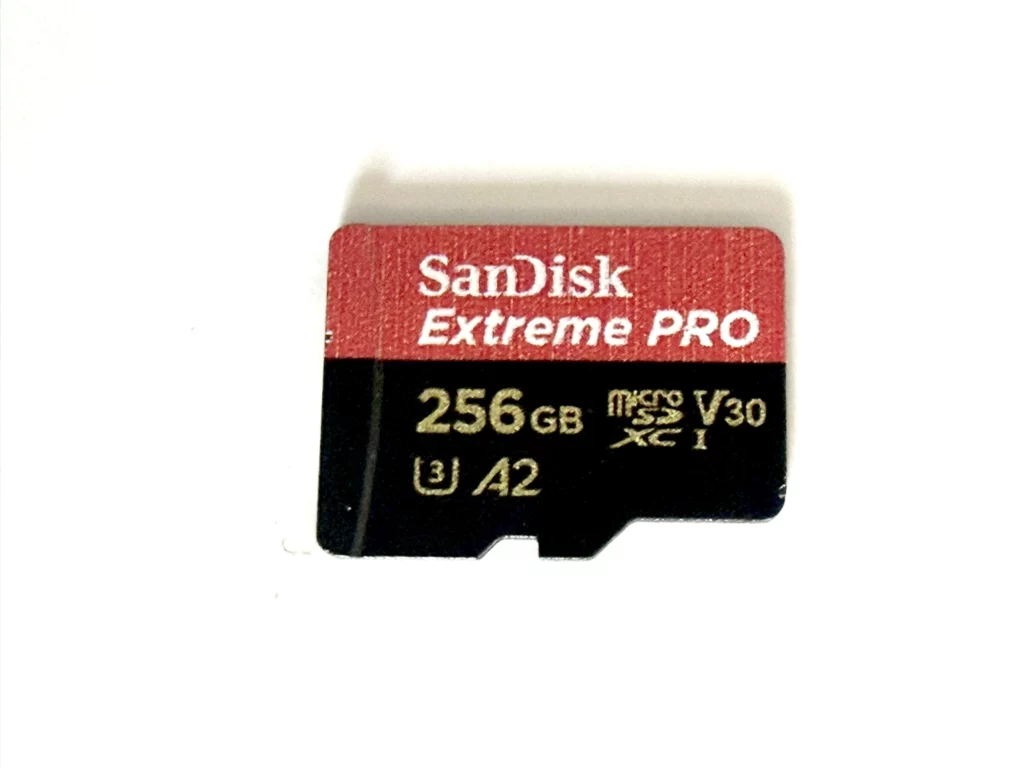
| Best premium option | SanDisk Extreme PRO 128GB or 256GB |
| Best DJI-friendly alternative | Kingston CANVAS Go! Plus 128GB or 256GB |
| Best Samsung option | Samsung PRO Plus 128GB or 256GB |
| Best Lexar option | Lexar Professional 1066x 128GB or 256GB |
| Best size for most beginners | 128GB |
| Best size for regular 4K filming | 256GB |
| Minimum rating to look for | U3 / V30 |
| What to avoid | Unknown cheap cards, slow U1 cards, fake cards |
What MicroSD Card Do You Need for a Drone?
For most modern beginner camera drones, look for a microSD card with these markings:
- microSDXC
- U3
- V30
- A1 or A2
- Class 10
- from a reputable brand
The most important labels for drone video are usually U3 and V30. These indicate that the card is designed for faster sustained writing, which matters when recording 4K video.
A drone does not just need a card that can hold files. It needs a card that can keep up while video is being written to it. That is why a cheap, slow card can cause problems even if the storage size looks large enough.
For most beginners, I would not overcomplicate it. Buy a good 128GB or 256GB U3/V30 card from a known brand and check that your drone supports that capacity.
Best Overall MicroSD Card for Drones: SanDisk Extreme 128GB
For most beginner drone owners, the SanDisk Extreme 128GB microSD card is the easiest recommendation.
It is widely available, commonly recommended for camera use, and sits in the right speed category for 4K drone footage. It is also usually much more sensible than buying a random cheap card with unclear performance.
A 128GB card is enough for most beginners because it gives plenty of space for normal flight sessions without encouraging you to leave weeks of footage sitting on the card. It also keeps the price sensible.
The SanDisk Extreme range is a strong fit for drones such as the DJI Flip, DJI Mini 4K, DJI Mini 4 Pro and similar lightweight camera drones, provided you check your drone’s supported card list and capacity limit before buying.
Who should buy it?
Buy the SanDisk Extreme 128GB if you want a safe, reliable first microSD card for a beginner camera drone.
Best Premium MicroSD Card for Drones: SanDisk Extreme PRO
The SanDisk Extreme PRO range is the premium option I would consider if you want a faster, higher-end card from a well-known brand.
For most beginners, the standard SanDisk Extreme is already enough. But if the price gap is small, the Extreme PRO is a strong upgrade, especially if you film regularly, transfer files often or use a more advanced drone such as the DJI Mini 4 Pro.
This is not about buying the most expensive card possible. It is about buying something reliable enough that the memory card is not the weak link in your setup.
For most drone users, I would look at 128GB or 256GB. Bigger cards can be useful, but they are not always necessary and may not be supported by every drone.
Who should buy it?
Buy the SanDisk Extreme PRO if you want a higher-end card for regular 4K filming, frequent file transfers or a more advanced drone.
Best DJI-Friendly Alternative: Kingston CANVAS Go! Plus
The Kingston CANVAS Go! Plus range is a strong alternative to SanDisk and is worth considering for DJI drones.
This range often appears in DJI recommended card lists for specific models, which makes it a sensible option for drone buyers who want something compatible with camera-drone use.
It is a good choice if SanDisk pricing is high, or if you simply prefer Kingston. As with any microSD card, choose the right capacity and check your drone’s supported card list before buying.
For most beginners, I would look at 128GB first. If you expect to record lots of 4K footage, 256GB is worth considering.
Who should buy it?
Buy Kingston CANVAS Go! Plus if you want a reliable DJI-friendly microSD card from a reputable brand.
Best Samsung MicroSD Card for Drones: Samsung PRO Plus
The Samsung PRO Plus is another good choice for drone users who want a reliable U3/V30 card from a major brand.
Samsung cards are widely used for cameras, action cameras and drones, and the PRO Plus range is a sensible alternative to SanDisk and Kingston. It is especially worth comparing if it is cheaper than the equivalent SanDisk card at the time you buy.
For most beginner drone users, a 128GB Samsung PRO Plus is enough. If you are filming regularly in 4K, consider 256GB.
Who should buy it?
Buy Samsung PRO Plus if you want a reputable alternative to SanDisk with strong 4K-friendly card ratings.
Best Lexar MicroSD Card for Drones: Lexar Professional 1066x
The Lexar Professional 1066x range is another solid drone-friendly option, especially for DJI users.
Lexar cards appear on recommended lists for some DJI drones, and the 1066x range is commonly used for action cameras, drones and compact cameras. It is a useful alternative if SanDisk or Kingston cards are expensive or out of stock.
For most buyers, choose a 128GB or 256GB Lexar Professional 1066x card with U3/V30 markings.
Who should buy it?
Buy Lexar Professional 1066x if you want a reliable drone-friendly card and it is priced well against SanDisk, Samsung and Kingston.
What Size MicroSD Card Is Best for a Drone?
For most beginners, 128GB is the best microSD card size.
It gives you enough room for 4K footage without costing too much or encouraging bad storage habits. You should still transfer your footage regularly, but 128GB gives most beginners a comfortable amount of space for normal flying.
A 64GB card can work, especially if you only film short clips. But if you shoot 4K video regularly, 64GB can start to feel limiting.
A 256GB card is useful if you film often, travel with your drone, or do not want to change cards frequently.
I would avoid going straight to 512GB or 1TB unless your drone specifically supports it and you genuinely need that much space. Larger cards cost more, and if you lose the drone or corrupt the card, you could lose more footage at once.
64GB vs 128GB vs 256GB for Drone Footage
| Card Size | Best For | My Verdict |
| 32GB | Very light use, older drones, short clips | Too small for most 4K beginners |
| 64GB | Casual flying and short 4K clips | Usable, but not ideal |
| 128GB | Most beginner drone users | Best starting point |
| 256GB | Regular 4K filming, travel, longer sessions | Best upgrade size |
| 512GB+ | Heavy filming, supported drones only | Check compatibility first |
For most people, I would buy one good 128GB card before buying one huge card. If you film a lot, buy a second 128GB or step up to 256GB.
What Speed MicroSD Card Do You Need for 4K Drone Video?
For 4K drone video, look for U3 and V30 as your baseline.
The card may also show labels such as A1, A2, Class 10, UHS-I or microSDXC. These can be useful, but U3 and V30 are the labels most beginners should look for when buying a card for 4K video.
Avoid old or slow U1 cards for modern 4K drone footage. They may work for basic photos or lower-resolution video, but they are not what I would buy for a new camera drone.
The drone itself also matters. A premium drone recording higher bitrates may be more demanding than a basic drone. Always check the manufacturer’s recommended card list for your specific model.
Best MicroSD Card for DJI Flip
For the DJI Flip, I would buy a 128GB or 256GB U3/V30 microSD card from SanDisk, Kingston, Samsung or Lexar.
The best simple choice is:
SanDisk Extreme 128GB
The best upgrade choice is:
SanDisk Extreme PRO 256GB
A good DJI-friendly alternative is:
Kingston CANVAS Go! Plus 128GB or 256GB
The DJI Flip is a proper 4K camera drone, so do not rely on internal storage for regular filming. Treat internal storage as a backup, not your main storage plan.
👉 Check price for SanDisk Extreme 128GB
👉 Check price for SanDisk Extreme PRO 256GB
Best MicroSD Card for DJI Mini 4K
For the DJI Mini 4K, I would buy a 128GB U3/V30 card from a reputable brand.
The best simple choice is:
SanDisk Extreme 128GB
The best alternative is:
Samsung PRO Plus 128GB
The DJI Mini 4K is a very strong value drone, but it needs a suitable microSD card if you want to record proper 4K footage. Do not spend hundreds on the drone and then put the cheapest unknown card inside it.
If you are buying the DJI Mini 4K Two-Battery Combo or Fly More Combo, add a suitable microSD card at the same time. That gives you a complete beginner setup: drone, extra flying time and storage for footage.
Best MicroSD Card for DJI Mini 4 Pro
For the DJI Mini 4 Pro, I would buy a higher-quality 128GB or 256GB card.
The best simple choice is:
SanDisk Extreme PRO 128GB or 256GB
Good alternatives include:
Lexar Professional 1066x 128GB or 256GB
Kingston CANVAS Go! Plus 128GB or 256GB
Samsung PRO Plus 128GB or 256GB
Because the DJI Mini 4 Pro is a more advanced drone, I would not cut corners on storage. If you are buying a premium drone, buy a card that suits that level of use.
For most Mini 4 Pro users, I would lean towards 256GB if you expect to film regularly.
👉 Check price for SanDisk Extreme PRO
👉 Check price for Lexar Professional 1066x
Does the original DJI Neo need a microSD card?
No. The original DJI Neo has 22GB of internal storage and cannot be expanded with an external SD card. Buying a microSD card will not increase its recording space. Transfer footage to a phone with DJI Fly QuickTransfer or connect the drone to a computer with a data cable, then clear space when you have backed up the files. DJI Neo specifications confirm the storage limit.
Best MicroSD Card for Potensic ATOM
For the Potensic ATOM, I would look for a 128GB or 256GB U3/V30 card.
The best simple choice is:
SanDisk Extreme 128GB
A good alternative is:
Samsung PRO Plus 128GB
You can also consider Potensic’s own ATOM-series microSD cards if they are available at a sensible price. The advantage is that they are clearly aimed at Potensic drones, but always compare the price with cards from SanDisk, Samsung, Kingston and Lexar.
The Potensic ATOM has a 4K camera and a 3-axis gimbal, so it deserves a proper card. Do not treat it like a toy drone and put a random slow card inside it.
Should You Buy One Big Card or Several Smaller Cards?
For most beginners, I prefer one or two good 128GB cards rather than one huge card.
There are three reasons for this.
First, it reduces the risk of losing everything at once. If you lose a drone, damage a card or accidentally corrupt footage, one giant card can mean a bigger loss.
Second, it encourages better habits. You are more likely to transfer and back up footage regularly if you are not leaving everything on one card for weeks.
Third, not every drone supports every card size. A very large card may be unnecessary or unsupported.
If you film often, two 128GB cards or one 256GB card is usually a better choice than one massive card.
How Many MicroSD Cards Do You Need for a Drone?
Most beginners only need one good card to start.
If you fly regularly, travel, film family events or shoot a lot of 4K footage, buy a second card as a backup.
A simple setup would be:
- one 128GB card for normal use
- one spare 128GB card in the drone case
That gives you a backup if you forget to clear the first card, fill it unexpectedly, or have an issue while out filming.
If you are more serious about drone video, two 256GB cards may make sense. But beginners should start simple.
Can You Use Any MicroSD Card in a Drone?
No. Do not assume any microSD card will work well in a drone.
Some older or cheaper cards may be too slow for 4K video. Some very large cards may not be supported by your drone. Some fake or low-quality cards may claim large capacity but fail in real use.
Before buying, check:
- the drone’s supported card type
- the maximum supported capacity
- the recommended speed class
- whether the card is genuine
- whether it comes from a reputable seller
A good microSD card is not exciting, but it is one of the easiest ways to avoid problems.
How to Avoid Fake MicroSD Cards
Fake microSD cards are a real problem, especially with popular brands.
To reduce the risk:
- buy from reputable retailers
- avoid prices that look suspiciously low
- check the packaging
- check reviews carefully
- test the card before relying on it
- avoid unknown sellers for expensive cards
This matters because fake cards can appear to work at first but fail when you start recording large video files.
If the card will hold footage you care about, do not gamble on the cheapest listing.
Should You Format a MicroSD Card in the Drone?
Yes. Once you insert the card, format it in the drone or through the drone app if that option is available.
Formatting the card in the drone helps reduce compatibility issues and gives the drone the file structure it expects.
Before formatting, make sure there is nothing on the card you need. Formatting deletes the contents.
It is also good practice to transfer footage to your computer or phone, back it up, then format the card again before important flights.
MicroSD Card Mistakes Beginners Make
Buying the cheapest card possible
This is the biggest mistake. A slow or unreliable card can ruin footage or cause recording errors.
Looking only at storage size
A large card is not useful if it is too slow. Speed and reliability matter.
Ignoring the drone’s compatibility list
Always check your exact drone model. Do not assume all DJI or Potensic drones support the same cards.
Leaving all footage on the card
Transfer and back up your footage regularly. The card should not be your only storage location.
Buying one huge card instead of backing up
A large card feels convenient, but losing it can mean losing a lot of footage at once.
Forgetting to buy a card at all
Some drones have limited internal storage, and some need a card for proper recording. Buy the card before your first real flight.
What I Would Buy First
If I were buying a microSD card for my first drone, I would buy a SanDisk Extreme 128GB U3/V30 microSD card.
It is the safest all-round recommendation for most beginner camera drones because it is reputable, widely available and suitable for 4K-style drone use.
If I were buying a more advanced drone or expected to film regularly, I would consider a SanDisk Extreme PRO 256GB instead.
If SanDisk pricing was poor, I would compare the Samsung PRO Plus, Kingston CANVAS Go! Plus and Lexar Professional 1066x ranges.
For most beginners, the important thing is not buying the most expensive card. It is buying a proper U3/V30 card from a trusted brand and making sure it is compatible with your drone.
Final Verdict: Best MicroSD Card for Drones UK
The best microSD card for most beginner drone users is the SanDisk Extreme 128GB.
It is a strong first choice for drones such as the DJI Flip, DJI Mini 4K, DJI Mini 4 Pro and Potensic ATOM, as long as you check your exact drone’s compatibility before buying.
If you film regularly in 4K or use a more advanced drone, step up to 256GB or consider the SanDisk Extreme PRO range.
The main rule is simple: buy a proper U3/V30 card from a reputable brand. Do not put a cheap unknown card in a drone you have just spent hundreds of pounds on.
FAQ
What microSD card do I need for a drone?
For most beginner camera drones, buy a microSDXC card with U3 and V30 ratings from a reputable brand such as SanDisk, Samsung, Kingston or Lexar. Always check your exact drone’s supported card list before buying.
What is the best microSD card for drones?
For most beginners, the SanDisk Extreme 128GB is the best overall choice. It is reliable, widely available and suitable for most 4K beginner drone use.
Is 128GB enough for drone footage?
Yes, 128GB is enough for most beginner drone users. It gives plenty of space for normal 4K flight sessions without costing too much.
Is 64GB enough for a drone?
A 64GB card can work for casual flying and short clips, but 128GB is usually a better starting point if you shoot 4K video.
Should I buy a 256GB microSD card for my drone?
Buy 256GB if you film regularly, travel with your drone, or want fewer card changes. For occasional beginner use, 128GB is usually enough.
Do I need a V30 card for drone video?
For most 4K drone video, yes, V30 is a sensible baseline. It helps ensure the card can handle sustained video recording.
Can I use a cheap microSD card in a drone?
You can, but it is not worth the risk. Cheap or unknown cards may be too slow, unreliable or fake. A poor card can cause recording problems or lost footage.
What is the best microSD card for DJI Flip?
For the DJI Flip, a SanDisk Extreme 128GB or 256GB, Kingston CANVAS Go! Plus, Samsung PRO Plus or Lexar Professional 1066x card with U3/V30 ratings is a sensible choice.
What is the best microSD card for DJI Mini 4K?
For the DJI Mini 4K, the SanDisk Extreme 128GB is a strong first choice. Samsung PRO Plus, Kingston CANVAS Go! Plus and Lexar Professional 1066x are also worth comparing.
What is the best microSD card for DJI Mini 4 Pro?
For the DJI Mini 4 Pro, consider SanDisk Extreme PRO, Lexar Professional 1066x, Kingston CANVAS Go! Plus or Samsung PRO Plus in 128GB or 256GB.
What is the best microSD card for Potensic ATOM?
For the Potensic ATOM, choose a 128GB or 256GB U3/V30 card from SanDisk, Samsung, Kingston, Lexar or Potensic’s own ATOM-series cards.
Should I format my microSD card in the drone?
Yes. Format the card in the drone or drone app before use, after making sure any important files are backed up.
How many microSD cards do I need for a drone?
Most beginners need one good card. If you fly regularly or travel, keep a second card in your case as a backup.
Are bigger microSD cards better for drones?
Not always. Bigger cards hold more footage, but they cost more and may not be supported by every drone. For most beginners, 128GB or 256GB is the best range.
Can a bad microSD card affect drone footage?
Yes. A slow or unreliable card can cause recording errors, dropped footage, failed clips or warnings in the drone app.