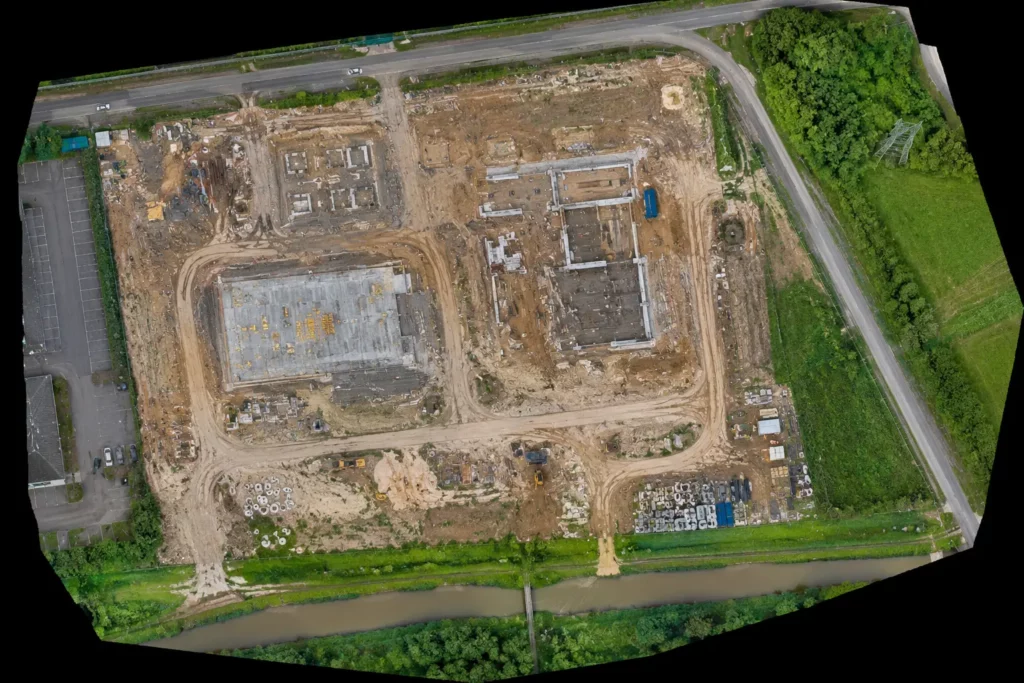
An orthomosaic is one of the most important outputs in drone mapping. It looks like a detailed aerial photograph, but it is not just a normal drone photo. A proper orthomosaic is made from many overlapping images that have been processed, corrected and stitched together to create a measurable top-down map.
That distinction matters. A single drone photo can look impressive, but it has perspective distortion. Objects closer to the camera may appear larger, straight lines may not represent true ground positions, and the image cannot be treated as a reliable map.
An orthomosaic is different. It is corrected so the scale is more consistent across the image, which means it can be used for mapping, measurement, site comparison and visual records.
For anyone learning about drone mapping, orthomosaics are a key concept. They connect directly to photogrammetry, RTK, PPK, ground control points, mapping software and professional drone buying decisions.
Table of Contents
ToggleQuick Answer: What Is a Drone Orthomosaic?
A drone orthomosaic is a corrected 2D aerial map created from many overlapping drone images.
The drone flies over a site in a planned pattern, capturing images with enough overlap for photogrammetry software to process them. The software aligns the images, corrects distortion and produces a single map-like image.
An orthomosaic can be used for:
- construction progress records
- land and estate mapping
- roof layout review
- stockpile and site context
- agricultural field monitoring
- infrastructure inspection records
- planning and access reviews
- environmental monitoring
- before-and-after comparisons
The important point is this:
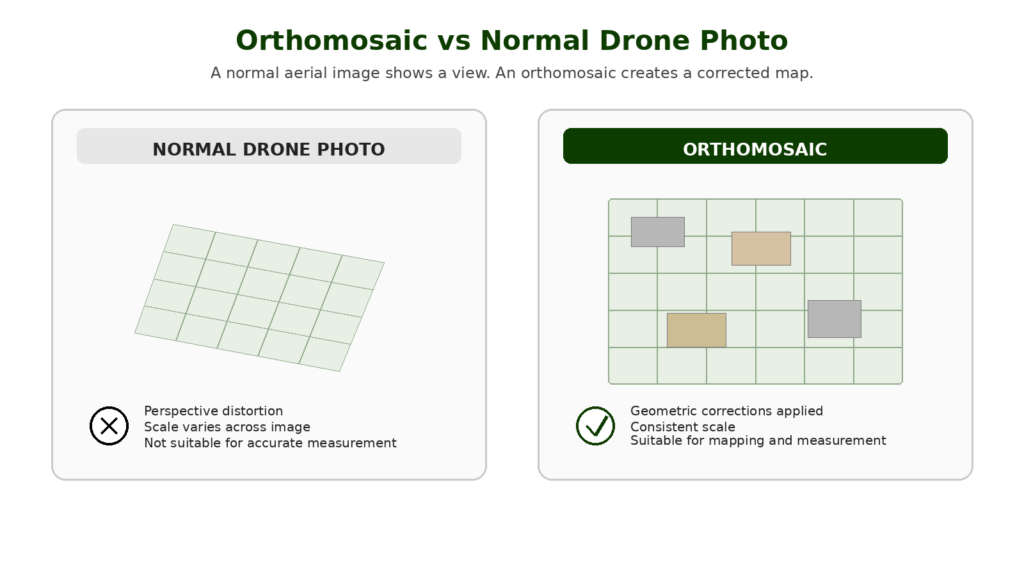
A normal drone photo shows a view. An orthomosaic creates a map.
Drone Orthomosaic vs Normal Aerial Photo
A normal aerial photo is taken from one camera position. It shows what the drone saw at that moment from that angle.
That can be useful for marketing, inspection and general visual context, but it is not the same as a corrected map.
A drone orthomosaic is built from many overlapping images. The images are processed together so that perspective distortion is reduced and the final output behaves more like a map than a photograph.
| Feature | Normal Drone Photo | Drone Orthomosaic |
|---|---|---|
| Image source | Single photo | Many overlapping photos |
| Purpose | Visual image | Measurable map-style output |
| Distortion | Perspective distortion remains | Corrected through processing |
| Scale | Varies across the image | More consistent scale |
| Use | Photography, marketing, inspection | Mapping, measurement, progress records |
| Software needed | No specialist mapping software | Photogrammetry/mapping software |
| Best for | Visual content | Site records and mapping outputs |
A normal drone photo can still be valuable. But when the job needs mapping, comparison or measurement, an orthomosaic is usually the more useful output.
How Is a Drone Orthomosaic Made?
A drone orthomosaic is made through a photogrammetry workflow.
The basic process looks like this:
- Define the site or area to be mapped.
- Plan a flight path over the area.
- Capture many overlapping images.
- Process the images in mapping software.
- Generate a corrected orthomosaic.
- Check the output for gaps, blur, distortion and accuracy.
- Export the final map for use.
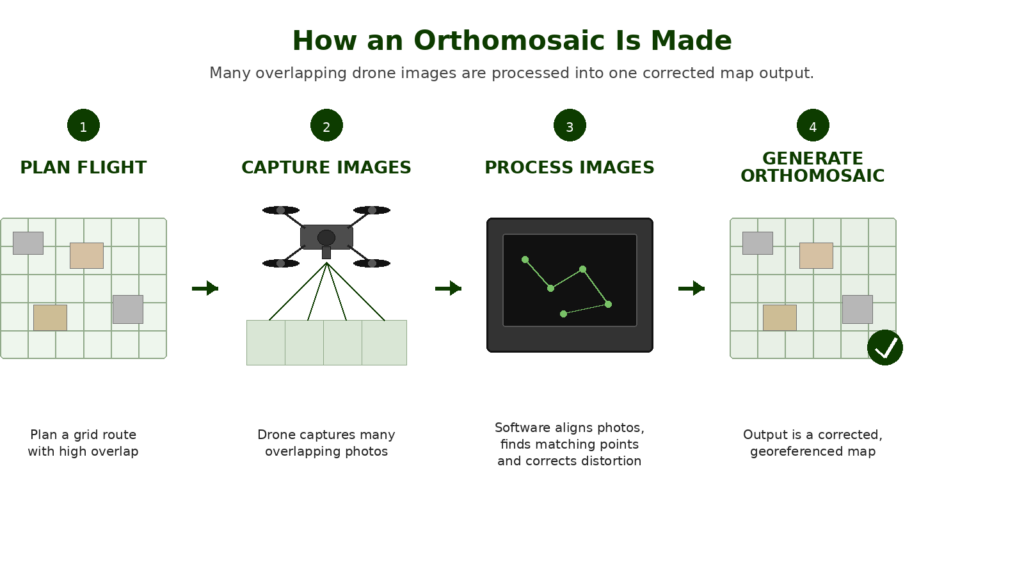
The key part is overlap. The drone does not just take random photos. It captures a structured set of images so the software can find matching points between them.
Those matching points allow the software to align the images and reconstruct the mapped area.
The result is a single large image that looks like an aerial map.
Why Image Overlap Matters
Overlap is one of the foundations of drone photogrammetry.
When a drone captures mapping images, each photo needs to overlap with the photos around it. This gives the software enough shared detail to identify matching points and build the orthomosaic.
Without enough overlap, the software may struggle. The final map may have gaps, distortions, blurry sections, alignment problems or failed processing.
Overlap requirements depend on the site, software, camera, flight height and subject. A flat open site may be easier than a complex roof, woodland edge or construction site with lots of vertical features.
For beginners, the key lesson is simple: an orthomosaic is only as good as the data captured during the flight.
What Is Orthorectification?
Orthorectification is the correction process that makes an orthomosaic useful as a map.
A normal image contains distortion caused by camera angle, lens characteristics, terrain height and perspective. Orthorectification corrects those distortions so the final image has a more consistent scale.
That does not mean every orthomosaic is automatically survey-grade. It means the image has been processed to behave more like a map than a raw photograph.
Accuracy still depends on the full workflow, including flight planning, camera quality, ground sampling distance, positioning, RTK or PPK use, ground control points, checkpoints and processing quality.
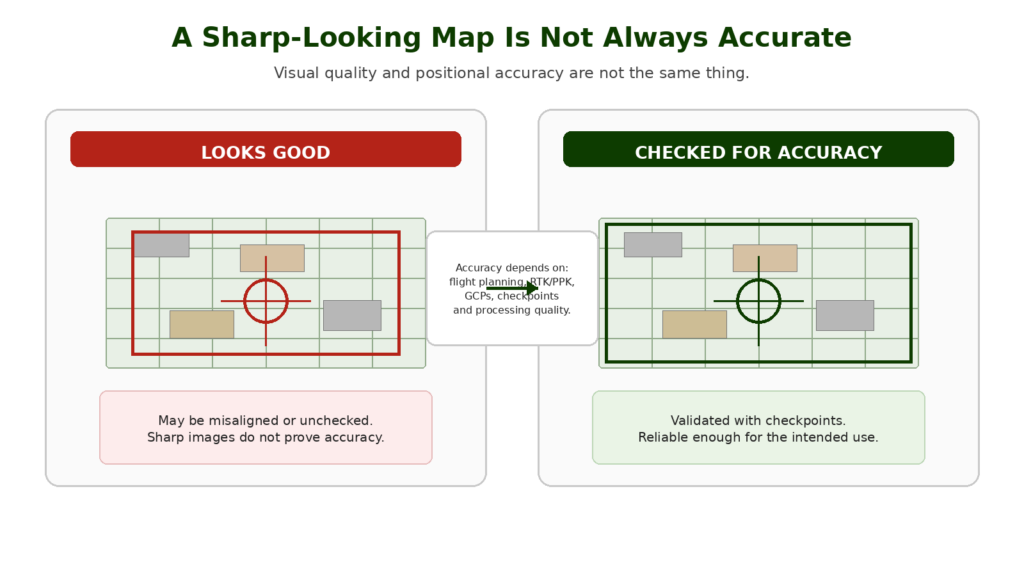
This is one of the biggest points serious drone operators need to understand: a sharp-looking orthomosaic is not automatically accurate enough for every professional use.
Orthomosaic vs Orthophoto
The terms orthomosaic and orthophoto are closely related.
An orthophoto is an aerial image that has been geometrically corrected. An orthomosaic is usually a mosaic made from many orthorectified images stitched together into a larger map.
In drone mapping, people often use the word orthomosaic because the final output is created from many overlapping drone images rather than one single aerial photograph.
For most practical drone mapping discussions, the important thing is not the terminology. The important thing is understanding that the final output has been corrected and mosaicked to create a map-like image.
What Is Ground Sampling Distance?
Ground Sampling Distance, often shortened to GSD, describes how much ground is represented by each pixel in the image.
A lower GSD means each pixel represents a smaller area on the ground, which usually means more detail. A higher GSD means each pixel represents a larger area, so the image has less detail.
GSD is affected by:
- flight height
- camera sensor size
- lens focal length
- image resolution
- drone and camera setup
For orthomosaics, GSD matters because it influences how much detail the final map can show.
A low-altitude flight may produce more detailed imagery, but it also creates more images to process and may need more careful planning. A higher flight may cover more area faster, but with less detail.
The right GSD depends on the job. A roof inspection, construction site record and agricultural field map may all need different levels of detail.
What Can You Use a Drone Orthomosaic For?
Orthomosaics are useful because they turn drone imagery into something easier to measure, compare and interpret.
Construction Progress Mapping
Construction is one of the clearest use cases.
An orthomosaic can show the full site from above, including access routes, material storage, earthworks, foundations, drainage, machinery and progress over time.
Repeated flights can create a visual record of site progress. This can help project managers, contractors, clients and stakeholders see what changed between dates.
Land and Estate Mapping
Orthomosaics are useful for landowners, estate managers, rural businesses and planning consultants.
They can show fields, buildings, woodland edges, tracks, drainage features, boundaries, hardstanding, ponds and access points.
A normal drone photo may show part of the land. An orthomosaic can show the whole mapped area in one corrected output.
Roof Layouts and Building Context
For roofs, an orthomosaic can help show the layout of a roof, surrounding access, valleys, flat roof sections, chimneys, skylights and solar panels.
It is not a replacement for a qualified roof inspection, but it can be a useful visual record and planning tool.
Detailed defect inspection may still need close-up images, oblique angles or thermal data depending on the job.
Agriculture and Field Monitoring
In agriculture, orthomosaics can provide a useful visual overview of fields and crop conditions.
They can help show drainage patterns, crop variation, bare patches, access issues, field boundaries and visible changes over time.
More advanced agricultural workflows may use multispectral imagery, vegetation indices or specialist software, but RGB orthomosaics are still a useful entry point.
Stockpile and Site Context
Orthomosaics can help document stockpiles, site layout, access routes and material areas.
For volume measurement, the orthomosaic is usually only part of the workflow. A 3D model, point cloud or surface model may also be needed.
This is a good example of why understanding outputs matters. An orthomosaic is useful, but it is not the only mapping deliverable.
Environmental and Habitat Monitoring
Orthomosaics can support environmental records, habitat monitoring, erosion checks, flood context, vegetation mapping and before-and-after comparisons.
For sensitive sites, the flight planning, permissions and environmental impact need to be considered carefully.
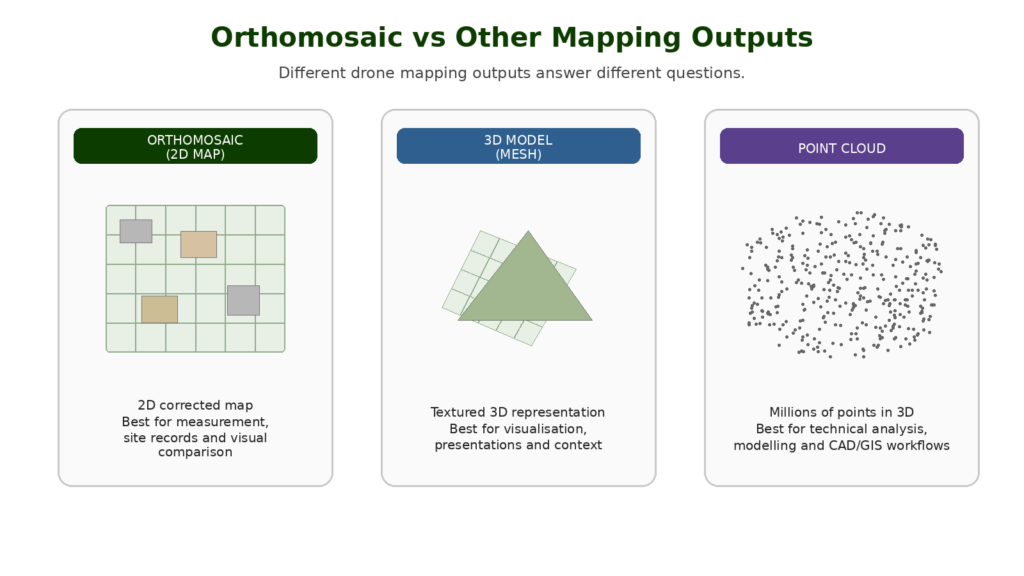
What Is the Difference Between an Orthomosaic and a 3D Model?
An orthomosaic is a 2D map-style image.
A 3D model represents shape and structure in three dimensions.
Both can come from the same photogrammetry dataset, but they are used differently.
| Output | Best For |
| Orthomosaic | Top-down visual map, site record, 2D measurement |
| 3D model | Buildings, structures, roofs, visual context, presentation |
| Point cloud | Technical 3D data, measurement, modelling |
| DSM | Surface elevations including objects |
| DTM | Bare ground model where objects are removed |
| Contours | Slope, elevation and landform understanding |
For many non-specialist clients, the orthomosaic is the easiest output to understand. For technical users, point clouds, surface models and CAD/GIS exports may be more important.
Common Mistakes Beginners Make With RTK and PPK
Thinking RTK Means No Ground Control
RTK can reduce ground control requirements, but it does not automatically remove the need for checkpoints or validation.
Thinking PPK Is Always More Accurate
PPK can be excellent, but it still depends on the quality of the recorded data, reference data, processing and workflow.
Ignoring Checkpoints
Checkpoints are one of the best ways to prove whether the output is accurate. Without checks, you are trusting the workflow rather than verifying it.
Confusing Relative and Absolute Accuracy
A model may be internally consistent but poorly positioned in the real world. Professional users need to understand the difference between how well the model fits itself and how well it fits real-world coordinates.
Buying an RTK Drone Too Early
RTK is useful, but it is not the first thing most beginners need. Learn mapping fundamentals first.
Treating Drone Mapping as Automatic Surveying
A drone can collect data for survey-style outputs, but proper surveying depends on method, control, checks and professional competence.
Ignoring Software Compatibility
Not every drone, camera or dataset works smoothly with every mapping software. Check compatibility before building a workflow around RTK or PPK.
Can You Measure From an Orthomosaic?
Yes, but with caution.
A well-made orthomosaic can be used for 2D measurements such as distances, areas and site dimensions. However, the reliability of those measurements depends on the quality and accuracy of the mapping workflow.
Measurement quality depends on:
- flight planning
- image overlap
- camera quality
- GSD
- georeferencing
- RTK or PPK use
- ground control points
- checkpoints
- processing software
- output resolution
- whether the map has been validated
This is where many beginners make a mistake. They assume that because a map looks sharp, it must be accurate.
That is not safe.
For casual planning and visual context, a basic orthomosaic may be useful. For professional measurement, the workflow needs to be checked and appropriate for the intended use.
 RTK vs PPK Drones Explained
Do You Need RTK or PPK for Orthomosaics?
Not always, but RTK and PPK can be very useful when accuracy matters.
A basic orthomosaic can be created without RTK or PPK, especially for learning, visual records or low-risk uses. But when the output needs accurate positioning, repeatable site comparison or measurement confidence, RTK, PPK, ground control points and checkpoints become much more important.
RTK and PPK improve the positioning of the images captured by the drone. Ground control and checkpoints help control and validate the final output.
For professional mapping, the best approach is usually not to rely on one thing. It is to use a workflow that matches the accuracy required.
Do You Need Ground Control Points for an Orthomosaic?
Sometimes.
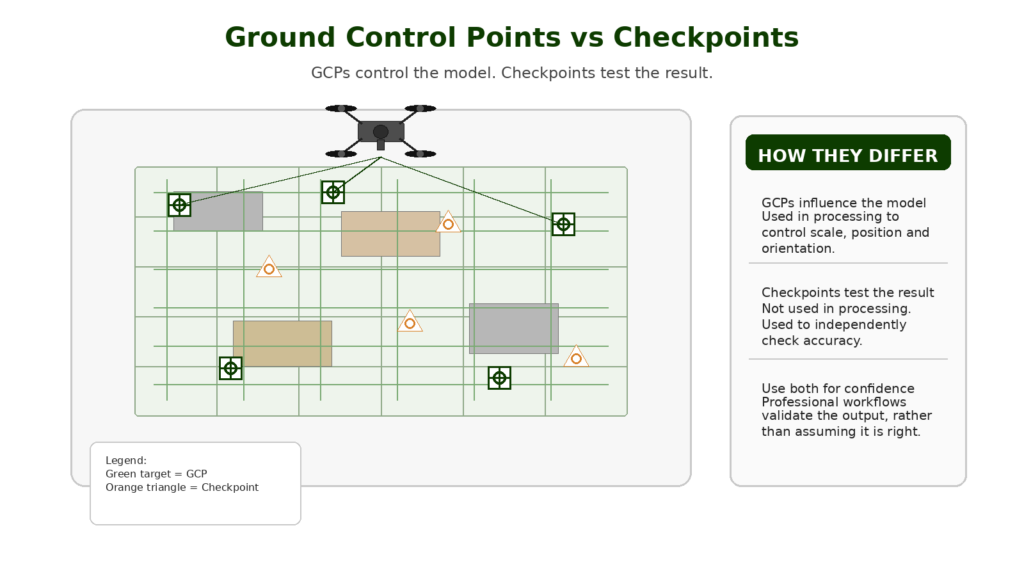
Ground control points, or GCPs, are known points on the ground that help georeference the mapping output.
They can improve accuracy and help align the orthomosaic to real-world coordinates.
Checkpoints are also important. A checkpoint is used to test the accuracy of the final output rather than control the model.
For serious mapping, checkpoints are one of the best ways to avoid overtrusting a visually impressive result.
The decision to use GCPs depends on:
- required accuracy
- drone positioning system
- site conditions
- whether RTK or PPK is used
- client requirements
- the purpose of the output
- professional risk
For learning and visual records, GCPs may not always be necessary. For measurement-focused work, they become much more important.
What Drone Do You Need to Create Orthomosaics?
You can learn the basics of orthomosaic creation with many camera drones, but serious mapping benefits from more suitable equipment.
Important drone features include:
- good camera quality
- sharp images
- reliable flight planning
- consistent image capture
- stable flight performance
- mechanical shutter where relevant
- RTK or PPK support for accuracy-focused work
- mapping software compatibility
- good battery life
- suitable image geotagging
- support from a recognised ecosystem
Not every drone that takes good photos is a good mapping drone.
A beginner camera drone can teach you the principles. A professional mapping drone is built for repeatable data capture.
The best drone for mapping depends on the output, required accuracy, software workflow and budget.
What Software Creates Drone Orthomosaics?
Drone orthomosaics are usually created with photogrammetry or mapping software.
Common software options include:
- Pix4D
- DJI Terra
- DroneDeploy
- Agisoft Metashape
- ArcGIS Drone2Map or ArcGIS Pro ortho mapping tools
- other photogrammetry and GIS workflows
The software processes overlapping images and generates outputs such as orthomosaics, point clouds, 3D meshes, DSMs and DTMs.
The best software depends on the drone, workflow, output, budget and whether the user needs cloud processing, desktop processing, CAD/GIS exports, site progress tools or inspection reporting.
Mapping software matters because it can be just as important as the drone when creating orthomosaics, point clouds, 3D models and other mapping outputs.
Orthomosaic Accuracy: What Beginners Need to Understand
Accuracy is not a single simple number.
A drone orthomosaic can have different types of accuracy:
- visual quality
- relative accuracy
- absolute accuracy
- measurement accuracy
- repeatability between flights
- alignment to real-world coordinates
A map might look excellent but be shifted slightly from its true location. It might be internally consistent but not aligned accurately to a coordinate system. It might be useful for visual comparison but unsuitable for precise measurement.
This is why professional mapping workflows use control, checks and documentation.
A responsible operator should understand what the orthomosaic is suitable for and what it is not suitable for.
Common Orthomosaic Mistakes
Thinking Stitching Is the Same as Orthomosaic Mapping
Simple image stitching is not the same as creating a properly orthorectified orthomosaic. A stitched panorama may look useful, but it does not necessarily have corrected scale or mapping accuracy.
Not Capturing Enough Overlap
Poor overlap can cause gaps, distortion or failed processing. Mapping flights need planned overlap, not random image capture.
Flying Too High for the Detail Needed
Higher flights cover more area but reduce detail. The flight height should match the output required.
Ignoring GSD
Ground Sampling Distance affects the detail visible in the final orthomosaic. A buyer choosing a mapping drone should understand this before assuming any 4K camera is suitable.
Trusting a Sharp-Looking Map Too Much
Visual quality is not the same as positional accuracy. A map can look good and still be misaligned or unchecked.
Forgetting About Lighting
Changing light, harsh shadows, glare, low light and reflective surfaces can all affect image matching and output quality.
Using the Wrong Drone for the Job
A consumer drone may be fine for learning or visual records. Professional mapping may require a better camera, RTK/PPK, suitable shutter, better workflow and proper software support.
What Should Beginners Learn Next?
An orthomosaic is only one mapping output. Once you understand it, the next subjects are:
- photogrammetry vs LiDAR
- RTK vs PPK
- ground control points
- checkpoints
- point clouds
- digital surface models
- digital terrain models
- mapping software
- best drones for mapping
Understanding mapping outputs helps buyers choose the right drone and software for the work they actually need to do.
Final Verdict: Why Orthomosaics Matter
An orthomosaic is one of the most useful outputs in drone mapping.
It turns a set of overlapping drone images into a corrected map-style image that can be used for site records, visual comparison, planning and 2D measurement.
For beginners, the key thing to understand is that an orthomosaic is not just a big stitched photo. It is an orthorectified mapping output created through a photogrammetry workflow.
For professional use, accuracy matters. The final orthomosaic depends on flight planning, overlap, camera quality, GSD, RTK or PPK, ground control, checkpoints and processing software.
Understanding orthomosaics also helps with buying decisions. The best drone for mapping is not always the drone with the flashiest video specification. It is the drone that can capture consistent, accurate, processable data for the output you actually need.
FAQ
What is a drone orthomosaic?
A drone orthomosaic is a corrected 2D map-style image made from many overlapping drone photos. It is processed to reduce distortion and create a more consistent scale across the mapped area.
Is an orthomosaic the same as a normal drone photo?
No. A normal drone photo is a single image with perspective distortion. An orthomosaic is made from many overlapping images and corrected to work more like a map.
Can you measure from an orthomosaic?
Yes, but measurement accuracy depends on how the orthomosaic was created. Flight planning, overlap, positioning, ground control, checkpoints and processing quality all matter.
What is an orthomosaic used for?
Orthomosaics are used for construction progress, land mapping, roof layouts, agriculture, environmental monitoring, site records, planning and visual comparison over time.
How is a drone orthomosaic made?
A drone flies a planned route over a site, captures overlapping images, and mapping software processes those images into a corrected map-style output.
What software creates orthomosaics?
Common drone mapping software includes Pix4D, DJI Terra, DroneDeploy, Agisoft Metashape and ArcGIS ortho mapping tools.
Do you need RTK for an orthomosaic?
Not always. RTK can improve positioning accuracy, but basic orthomosaics can be created without RTK. Accuracy-focused work may need RTK, PPK, GCPs and checkpoints.
Do you need ground control points for an orthomosaic?
Sometimes. GCPs help improve or control accuracy. Checkpoints are useful for testing whether the final output is accurate enough for the intended use.
What is GSD in drone mapping?
GSD stands for Ground Sampling Distance. It describes how much ground each pixel represents. Lower GSD usually means more detail.
Is an orthomosaic a 3D model?
No. An orthomosaic is a 2D map-style image. A 3D model or point cloud represents shape and structure in three dimensions.
Can a beginner drone create an orthomosaic?
Some beginner drones can be used to learn the basics of orthomosaic creation, but professional mapping usually needs better equipment, software, positioning and workflow control.
What is the best drone for creating orthomosaics?
The best drone depends on the required accuracy, site type, camera quality, RTK or PPK needs and software workflow. For professional mapping, choose a drone built for consistent data capture rather than only video quality.
Are orthomosaics useful for roof inspections?
They can be useful for roof layout and context, but close-up images, oblique views or thermal data may still be needed for detailed inspection.
Are orthomosaics useful for construction sites?
Yes. Orthomosaics are very useful for construction progress records, site comparison, access planning, stockpile context and visual reporting.
Is an orthomosaic survey-grade?
Not automatically. Survey-grade outputs depend on the full workflow, equipment, control, checks and professional competence behind the data.