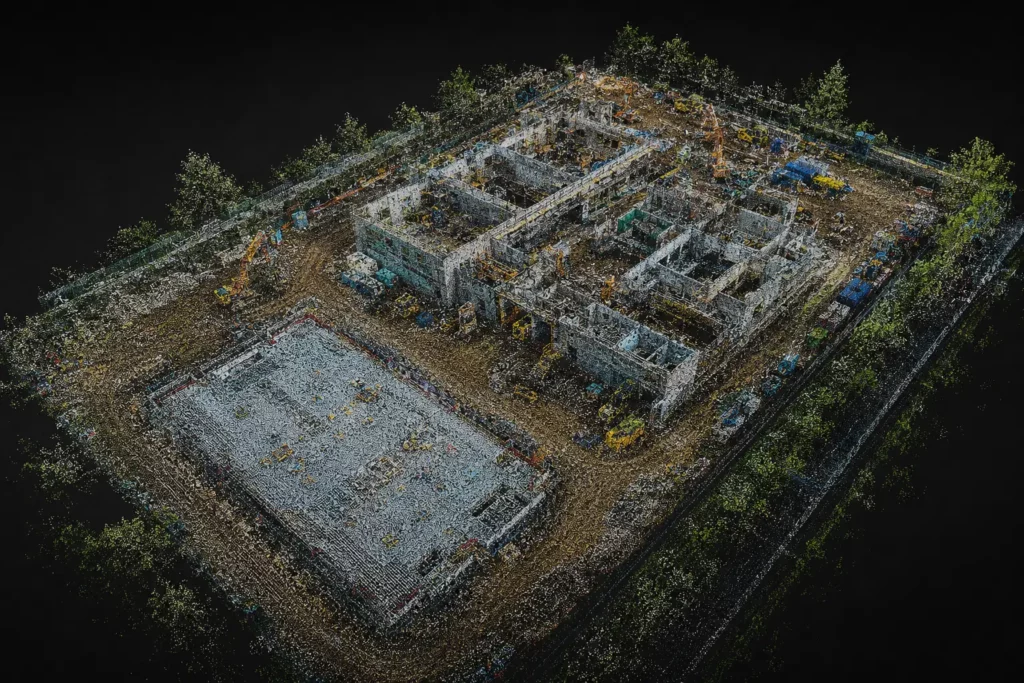
A drone point cloud is one of the most important outputs in 3D drone mapping. It is also one of the easiest concepts to misunderstand.
An orthomosaic gives you a corrected 2D map. A point cloud gives you a 3D dataset. Instead of looking like a normal aerial image, a point cloud is made up of millions of individual points in space. Each point has a position, and together those points can represent terrain, buildings, roofs, stockpiles, trees, structures, infrastructure or whole sites.
Point clouds matter because they move drone mapping beyond flat images. They are used for 3D modelling, measurements, terrain analysis, building inspection, stockpile calculations, construction records, LiDAR mapping and survey-style workflows.
For anyone serious about professional drone use, point clouds are a key concept. They connect directly to photogrammetry, LiDAR, RTK, PPK, ground control, mapping software and mapping-drone buying decisions.
Table of Contents
ToggleQuick Answer: What Is a Drone Point Cloud?
A drone point cloud is a 3D dataset made from many individual points. Each point has a position in space, usually represented by X, Y and Z coordinates.
Together, those points form a digital 3D representation of the mapped subject.
A drone point cloud can show:
- ground levels
- buildings
- roofs
- stockpiles
- trees
- slopes
- roads
- structures
- powerlines
- construction sites
- terrain
- infrastructure
Point clouds can be created from drone photogrammetry or drone LiDAR. The method used affects the accuracy, density, visual detail and suitability of the final dataset.
The simplest way to understand it is this:
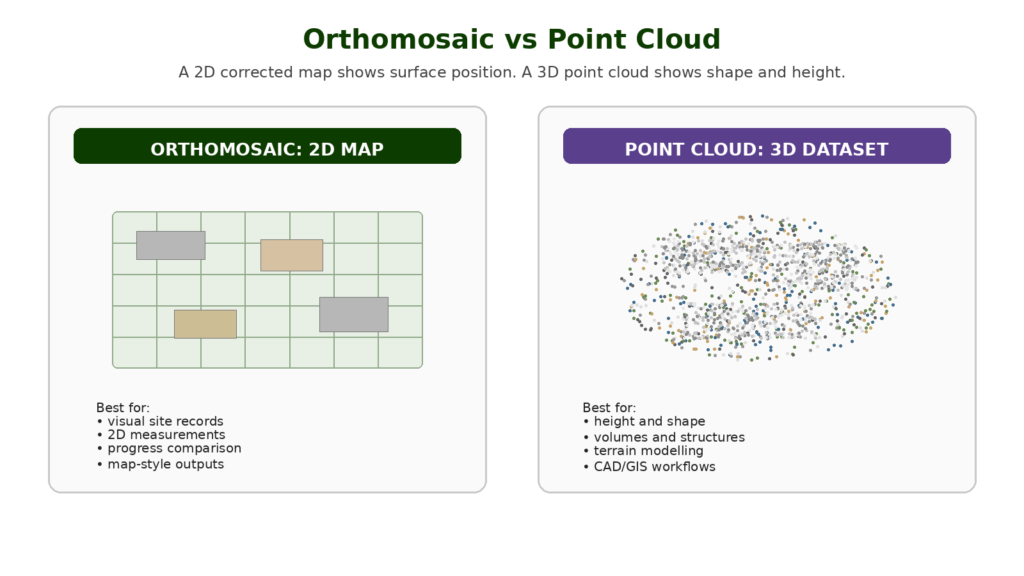
An orthomosaic is a 2D map. A point cloud is a 3D cloud of measured points.
Drone Point Cloud vs Orthomosaic
A point cloud and an orthomosaic are both drone mapping outputs, but they are used differently.
An orthomosaic is a corrected 2D image. It is useful for visual maps, site records, 2D measurements and progress comparison.
A point cloud is a 3D dataset. It is useful for shape, height, volume, structure and terrain.
| Output | Main Type | Best For |
|---|---|---|
| Orthomosaic | 2D corrected map | Site records, visual comparison, 2D measurement |
| Point cloud | 3D dataset | Height, shape, terrain, structures, volume and modelling |
| 3D model | Textured 3D surface | Presentation, visualisation and context |
| DSM | Surface elevation model | Ground plus objects such as trees and buildings |
| DTM | Bare-earth terrain model | Ground level with objects removed where possible |
A construction manager may find an orthomosaic easier to read at first glance. A surveyor, engineer or modeller may need the point cloud because it contains 3D structure and height information.
Both outputs can be valuable. The right one depends on the job.
Common Mistakes Beginners Make With RTK and PPK
Thinking RTK Means No Ground Control
RTK can reduce ground control requirements, but it does not automatically remove the need for checkpoints or validation.
Thinking PPK Is Always More Accurate
PPK can be excellent, but it still depends on the quality of the recorded data, reference data, processing and workflow.
Ignoring Checkpoints
Checkpoints are one of the best ways to prove whether the output is accurate. Without checks, you are trusting the workflow rather than verifying it.
Confusing Relative and Absolute Accuracy
A model may be internally consistent but poorly positioned in the real world. Professional users need to understand the difference between how well the model fits itself and how well it fits real-world coordinates.
Buying an RTK Drone Too Early
RTK is useful, but it is not the first thing most beginners need. Learn mapping fundamentals first.
Treating Drone Mapping as Automatic Surveying
A drone can collect data for survey-style outputs, but proper surveying depends on method, control, checks and professional competence.
Ignoring Software Compatibility
Not every drone, camera or dataset works smoothly with every mapping software. Check compatibility before building a workflow around RTK or PPK.
How Drone Point Clouds Are Created
Drone point clouds are usually created in one of two ways:
- photogrammetry
- LiDAR
Photogrammetry creates point clouds from overlapping images. LiDAR creates point clouds from laser measurements.
Both methods can produce useful 3D data, but they work differently.
A typical drone point cloud workflow looks like this:
- Define the area or object to capture.
- Choose the right drone, sensor and flight plan.
- Capture images or LiDAR data.
- Process the data in mapping software.
- Generate a point cloud.
- Clean, classify or colourise the point cloud where needed.
- Check accuracy and quality.
- Export the data for analysis, CAD, GIS or reporting.
A point cloud is not just created by flying over a site and taking random photos. The quality depends on the capture method, positioning, overlap, processing and validation.
Photogrammetry Point Clouds
A photogrammetry point cloud is created from overlapping photographs.
The drone captures many images from different positions. Mapping software finds matching points between those images and uses them to reconstruct the 3D shape of the scene.
This is the same broad workflow used to create orthomosaics and 3D models. The point cloud is one of the outputs generated during processing.
Photogrammetry point clouds are often visually useful because they can be colourised from the original images. This makes them easier to interpret for buildings, roofs, construction sites and visual records.
Photogrammetry point clouds are commonly used for:
- construction progress
- roof and building models
- stockpile measurement
- land mapping
- site documentation
- 3D visualisation
- heritage recording
- simple terrain and surface analysis
The limitation is that photogrammetry depends on what the camera can see and match. It can struggle with vegetation, shiny surfaces, uniform textures, shadows, reflective roofs, water and areas with poor image overlap.
LiDAR Point Clouds
A LiDAR point cloud is created from laser measurements.
The LiDAR sensor sends out pulses of light and measures how long they take to return. Those measurements become points in 3D space.
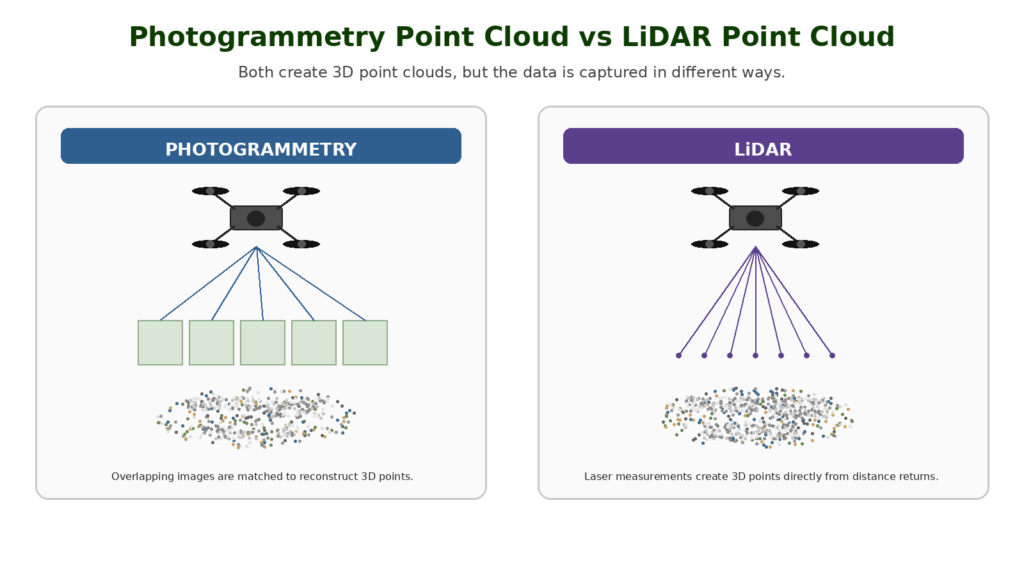
LiDAR is especially useful where photogrammetry struggles. It can capture strong 3D structure and may perform better in vegetation, corridors, terrain, infrastructure and complex survey-style workflows.
LiDAR point clouds are commonly used for:
- forestry
- terrain mapping
- utility corridors
- powerlines
- railway and road corridors
- flood modelling
- quarry mapping
- construction modelling
- infrastructure inspection
- specialist survey workflows
LiDAR equipment is usually more expensive than a standard camera-drone photogrammetry setup. It also requires more technical understanding, especially around positioning, calibration, processing and classification.
LiDAR is powerful, but it is not magic. The dataset still needs to be processed, checked and interpreted properly.
What Information Does a Point Cloud Contain?
At the simplest level, a point cloud contains many points with 3D coordinates.
Those coordinates usually describe position:
- X position
- Y position
- Z height or elevation
Depending on the method and software, a point may also contain other information such as:
- colour
- intensity
- classification
- return number
- timestamp
- confidence or quality information
- RGB values from imagery
- surface category
For a beginner, the most important thing is that a point cloud is not just a picture. It is spatial data.
That means it can be used for analysis, measurement, modelling and export into professional software.
What Are Drone Point Clouds Used For?
Drone point clouds are used when a project needs 3D information rather than only a flat map.
They can help show shape, height, slope, volume, structure and surface detail.
Common uses include:
- measuring stockpile volumes
- modelling construction sites
- analysing ground levels
- creating 3D building context
- supporting roof inspections
- mapping terrain
- creating DSMs and DTMs
- exporting data to CAD or GIS
- supporting survey workflows
- comparing site changes over time
The point cloud is often not the final deliverable on its own. It may be used to create other outputs such as surfaces, meshes, models, contour lines or volume calculations.
Point Clouds for Construction
Construction is one of the clearest use cases for drone point clouds.
A point cloud can help document a site in 3D. It can show earthworks, foundations, stockpiles, access routes, structures, temporary works and progress over time.
Compared with a normal aerial image, a point cloud gives more spatial context. It can help answer questions about height, shape, volume and site change.
Construction point clouds can support:
- progress records
- earthworks monitoring
- stockpile calculations
- site comparison between dates
- 3D context for project teams
- visual documentation
- model comparison where suitable
Point Clouds for Stockpile Measurement
Stockpile measurement is one of the most practical reasons to create a drone point cloud.
The point cloud helps represent the shape of the pile in 3D. Mapping software can then use that data to calculate volume, usually by comparing the pile surface to a base surface.
This can be useful for:
- aggregates
- soil
- sand
- stone
- waste material
- quarry stockpiles
- construction materials
- landscaping materials
- earthworks
For open stockpiles with good surface texture, photogrammetry may be enough. For more complex sites or higher-value workflows, LiDAR may be considered.
The key point is that volume measurement depends on the quality of the data and the assumptions behind the base surface. A point cloud makes volume calculations possible, but it does not remove the need for proper workflow and validation.
Point Clouds for Roofs and Buildings
Point clouds can be useful for roofs and buildings because they show 3D structure.
A roof point cloud can help represent:
- roof planes
- ridges
- valleys
- chimneys
- skylights
- dormers
- flat roof areas
- surrounding access
- solar panel layouts
- building context
For many roof inspections, high-resolution images are still the most important deliverable. A point cloud can add 3D context, especially where roof layout, slope, access or modelling matters.
For detailed defect identification, close-up imagery, oblique images or thermal data may still be needed. A point cloud is useful, but it does not replace expert interpretation.
Point Clouds for Terrain and Land Mapping
Point clouds are useful for terrain and land mapping because they can represent height and surface shape.
They can support:
- slope analysis
- contour generation
- drainage understanding
- earthworks
- landform modelling
- flood context
- cut-and-fill workflows
- estate and land management
- environmental monitoring
Photogrammetry point clouds can work well on open land where the ground is visible and textured. LiDAR becomes more useful where vegetation hides the ground or the workflow needs stronger terrain information.
This is why point clouds sit at the centre of serious drone mapping. They are the link between aerial data capture and practical 3D analysis.
Point Clouds for LiDAR Survey Work
LiDAR point clouds are especially important in survey-style drone workflows.
LiDAR can capture dense 3D data across terrain, vegetation, buildings, corridors and infrastructure. That makes it useful for higher-value professional work.
Examples include:
- forestry surveys
- utility corridors
- powerline mapping
- railway corridors
- road corridors
- flood modelling
- quarry work
- terrain modelling
- infrastructure mapping
LiDAR point clouds may also be classified. Classification means points are assigned categories such as ground, vegetation, buildings or other features.
This makes the data easier to analyse and helps create outputs such as digital terrain models or digital surface models.
Point Cloud vs 3D Model
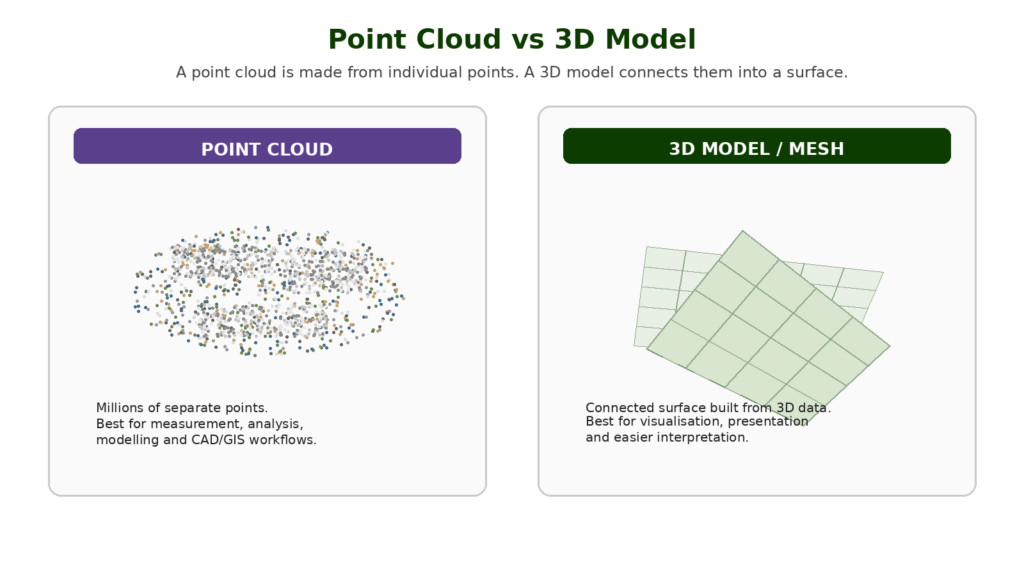
A point cloud and a 3D model are not the same thing.
A point cloud is made of individual points. A 3D model usually creates a surface or mesh from the data.
Think of the point cloud as the raw 3D point dataset. The 3D model is a more visually connected surface built from that data.
| Output | What It Is | Best For |
| Point cloud | Millions of individual 3D points | Measurement, modelling, analysis, CAD/GIS |
| 3D mesh/model | Surface built from 3D data | Visualisation, presentations, context |
| Textured 3D model | Mesh with image texture applied | Easy visual interpretation |
Point clouds are often more technical. 3D models are often easier for non-specialists to understand visually.
For serious drone work, both can matter.
Point Cloud vs Digital Surface Model
A digital surface model, or DSM, represents the surface including objects above the ground.
That means a DSM may include:
- buildings
- trees
- vegetation
- vehicles
- stockpiles
- structures
- ground surface
A point cloud can be used to create a DSM.
The difference is that the point cloud is a collection of individual 3D points, while the DSM is a gridded or surface-style output derived from the data.
A DSM is useful when you want to understand the visible surface of the site, including objects.
Point Cloud vs Digital Terrain Model
A digital terrain model, or DTM, represents the bare ground surface, with objects such as buildings and vegetation removed where possible.
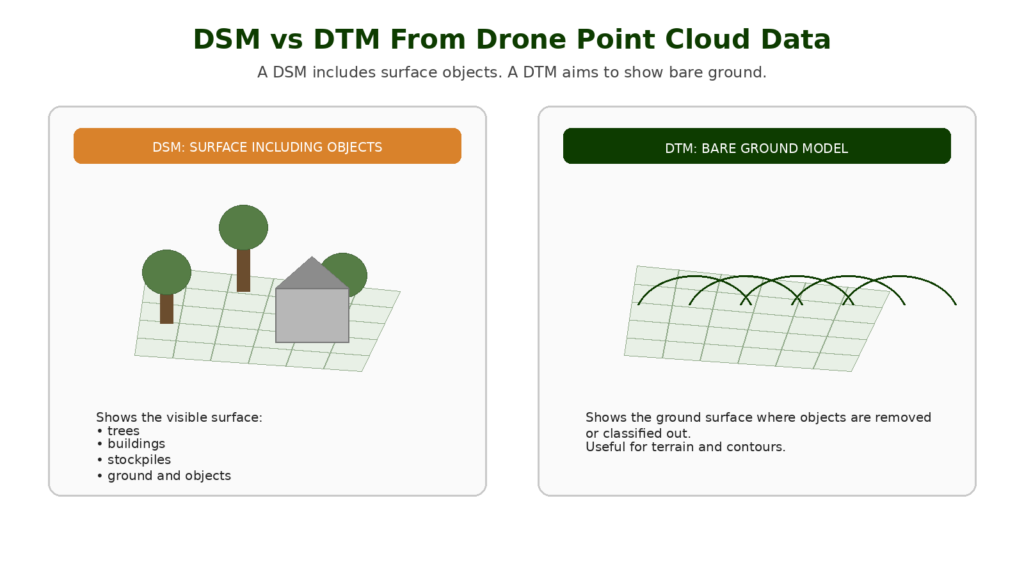
LiDAR is often useful for creating DTMs, especially in vegetated areas, because it may capture ground returns through gaps in vegetation.
Photogrammetry can create terrain outputs too, but if the camera cannot see the ground, it cannot reconstruct it properly.
The practical difference is simple:
- DSM = surface including objects
- DTM = bare ground surface
- point cloud = 3D point data that may be used to create either output
Accuracy: Why Point Clouds Need Validation
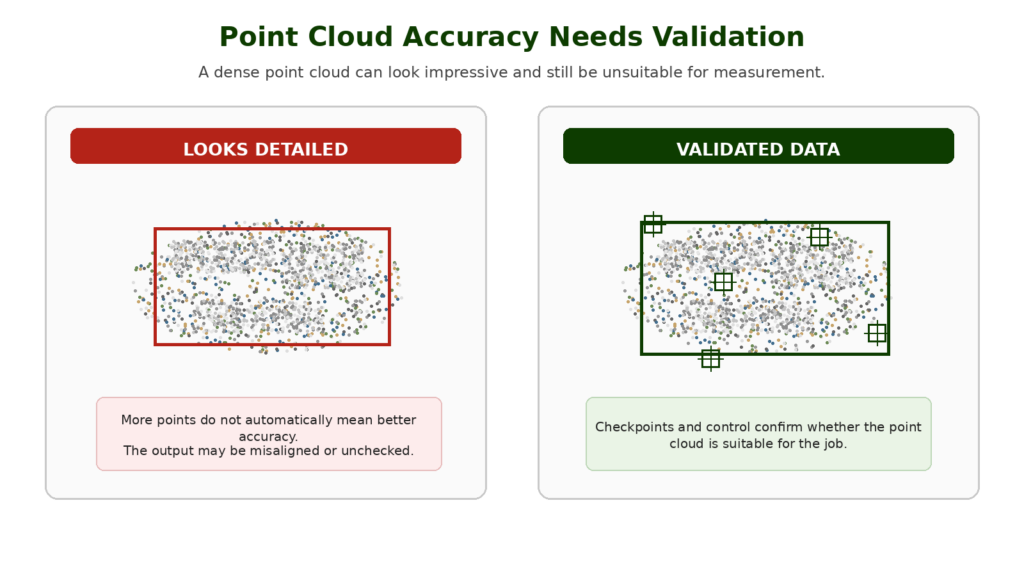
A point cloud can look impressive and still be inaccurate.
This is one of the most important professional lessons.
A dense point cloud is not automatically reliable. A visually detailed 3D dataset is not automatically suitable for measurement. A LiDAR point cloud is not automatically survey-grade just because it came from a LiDAR sensor.
Accuracy depends on:
- flight planning
- image overlap
- LiDAR calibration
- GNSS quality
- RTK or PPK workflow
- ground control points
- checkpoints
- camera quality
- sensor quality
- processing settings
- coordinate systems
- operator skill
- validation method
For professional work, point clouds should be checked against known points or suitable validation methods.
This affects what drone and software someone should buy. The best drone for mapping is not just the one with the best camera or most impressive sensor. It is the one that fits the accuracy and workflow requirements of the job.
Do You Need RTK or PPK for Point Clouds?
Not always, but RTK and PPK become important when accuracy matters.
A beginner can create a point cloud from a standard camera drone to understand the process. But for professional mapping, especially where measurements, repeatability or real-world positioning matter, RTK, PPK, ground control points and checkpoints become much more important.
RTK and PPK improve positioning data. Ground control and checkpoints help control and validate the output.
A good point cloud workflow does not rely on one feature. It combines suitable capture, positioning, processing and validation.
What Drone Do You Need to Create Point Clouds?
The right drone depends on the type of point cloud you need.
For learning photogrammetry, a capable camera drone may be enough. You can practise image overlap, processing and basic 3D reconstruction with accessible equipment.
For professional photogrammetry point clouds, look for features such as:
- strong camera quality
- sharp still images
- reliable flight planning
- stable image capture
- RTK or PPK support where accuracy matters
- suitable shutter behaviour
- mapping software compatibility
- good battery life
- consistent geotagging
- reliable ecosystem support
For LiDAR point clouds, you need a compatible drone and LiDAR payload. This usually moves into enterprise drone territory.
The right drone depends on the output required. A learning setup, a professional photogrammetry workflow, an RTK mapping job and a LiDAR project all need to be treated differently.
What Software Is Used for Point Clouds?
Point clouds are created, processed, cleaned, viewed and exported using mapping, photogrammetry, LiDAR, CAD or GIS software.
Common software names in drone mapping include:
- Pix4D
- DJI Terra
- DroneDeploy
- Agisoft Metashape
- ArcGIS
- CloudCompare
- Autodesk workflows
- specialist LiDAR processing tools
Different software is better suited to different workflows.
Some tools are strong for photogrammetry. Some are better for LiDAR. Some are used for GIS analysis. Some are used for CAD or construction workflows.
The drone is only one part of the mapping setup. The processing workflow can matter just as much as the aircraft or sensor used to capture the data.
Can Beginner Drones Create Point Clouds?
Yes, some beginner drones can be used to learn the basics of point cloud creation.
If a drone can capture suitable overlapping images, you may be able to process those images into a basic photogrammetry point cloud.
However, that does not mean the output is suitable for professional work.
Beginner drones may have limitations around:
- image quality
- flight planning
- geotagging
- shutter behaviour
- positioning accuracy
- software compatibility
- battery life
- repeatability
- wind stability
A beginner drone can help you understand the concept. A professional mapping drone is designed for repeatable data capture and more serious outputs.
This distinction matters because the best drone for learning mapping is not always the best drone for professional mapping.
Are Drone Point Clouds Survey-Grade?
Not automatically.
A drone point cloud can support survey-style workflows, but it is not survey-grade just because it exists.
Survey-grade outputs depend on the full workflow:
- equipment
- calibration
- flight planning
- control
- checkpoints
- processing
- coordinate systems
- operator competence
- accuracy reporting
- professional interpretation
The more accurate way to think about it is this: drones can collect powerful mapping data, but professional outputs require professional workflows.
Common Beginner Mistakes With Point Clouds
Thinking More Points Always Means Better Data
A denser point cloud is not automatically better. The points need to be accurate, useful and suitable for the output.
Confusing Point Clouds With 3D Models
A point cloud is made of individual points. A 3D model is usually a connected surface or mesh. They are related, but not the same.
Trusting a Point Cloud Because It Looks Impressive
Visual complexity is not accuracy. A point cloud can look detailed and still be misaligned or poorly processed.
Ignoring Ground Control and Checkpoints
If the output is used for measurement, validation matters. RTK, PPK, GCPs and checkpoints all need to be understood.
Using the Wrong Drone for the Job
A basic drone may teach the concept, but professional mapping needs suitable equipment and workflow.
Forgetting About File Size and Processing Power
Point clouds can be large. Processing, viewing and editing them may require a capable computer, software and storage setup.
Not Knowing the Required Output
A point cloud may not be the final thing the client needs. They may actually need an orthomosaic, DSM, DTM, contour map, CAD export or inspection report.
What Should Beginners Learn Next?
Once you understand point clouds, the next subjects are:
- LiDAR drone mapping
- DSM vs DTM
- drone mapping software
- ground control points
- checkpoints
- point cloud classification
- contour maps
- best drones for mapping
- best LiDAR drones
- best RTK drones
This is where drone mapping starts to become a serious technical subject rather than just aerial photography.
👉 Drone Mapping Explained for UK Beginners
Final Verdict: Why Drone Point Clouds Matter
A drone point cloud is a 3D dataset made from many individual points in space.
It can be created from photogrammetry or LiDAR, and it can represent terrain, buildings, roofs, stockpiles, trees, infrastructure and construction sites.
Point clouds matter because they allow drone data to be used for 3D mapping, measurement, modelling and analysis. They are one of the main reasons drones are valuable beyond normal aerial photography.
For beginners, the key thing is to understand that a point cloud is not just a pretty 3D picture. It is spatial data. The quality of that data depends on the drone, sensor, flight planning, positioning, processing and validation.
Understanding point clouds also helps with buying decisions. The best drone for mapping is not simply the drone with the best video specification. It is the drone that can capture the right kind of data for the outputs you actually need.
FAQ
What is a drone point cloud?
A drone point cloud is a 3D dataset made from many individual points. Each point has a position in space, and together the points represent terrain, buildings, roofs, stockpiles or other mapped features.
What is a point cloud used for?
Point clouds are used for 3D mapping, measurement, modelling, stockpile calculations, construction records, terrain analysis, building context, LiDAR mapping and survey-style workflows.
Is a point cloud the same as an orthomosaic?
No. An orthomosaic is a corrected 2D map. A point cloud is a 3D dataset made from individual points.
Is a point cloud the same as a 3D model?
No. A point cloud is made of individual points. A 3D model or mesh is usually a connected surface created from 3D data.
How are drone point clouds created?
Drone point clouds are usually created from overlapping images using photogrammetry or from laser measurements using LiDAR.
What is a photogrammetry point cloud?
A photogrammetry point cloud is created from overlapping drone images. Software matches points between the images and reconstructs the scene in 3D.
What is a LiDAR point cloud?
A LiDAR point cloud is created from laser measurements. The LiDAR sensor sends out pulses of light and measures their return to create 3D points.
Is LiDAR better than photogrammetry for point clouds?
LiDAR is better for some specialist 3D, terrain and vegetation workflows. Photogrammetry is often more accessible and better for visually rich point clouds. The right choice depends on the job.
Can drone point clouds be used for measurements?
Yes, but measurement reliability depends on the workflow. Flight planning, RTK or PPK, ground control, checkpoints, processing and validation all matter.
Do you need RTK for point clouds?
Not always. RTK can improve positioning accuracy, but beginner point clouds can be created without it. Professional accuracy-focused work may need RTK, PPK, GCPs and checkpoints.
Can a beginner drone create a point cloud?
Some beginner drones can create basic photogrammetry point clouds if they capture suitable overlapping images. Professional work usually needs more suitable mapping equipment and workflow control.
What software creates drone point clouds?
Common software includes Pix4D, DJI Terra, DroneDeploy, Agisoft Metashape, ArcGIS, CloudCompare and other photogrammetry, LiDAR, CAD or GIS tools.
Are point clouds used in construction?
Yes. Point clouds are useful for construction progress, earthworks, stockpile measurement, 3D site context and comparison between dates.
Are point clouds useful for roof inspections?
They can be useful for roof layout, building shape and 3D context, but close-up images, oblique views or thermal data may still be needed for detailed inspection.
Are drone point clouds survey-grade?
Not automatically. Survey-grade outputs depend on equipment, workflow, control, checkpoints, processing, coordinate systems and professional competence.
What is point cloud classification?
Point cloud classification is the process of assigning points to categories such as ground, vegetation, buildings or other features. This is especially useful in LiDAR and terrain workflows.