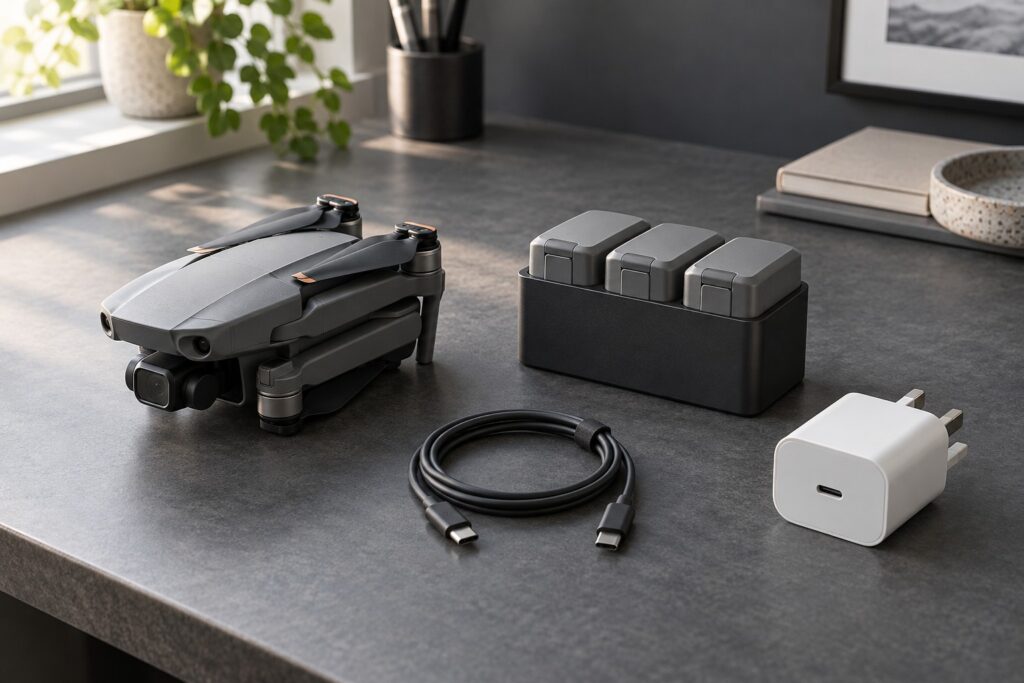
For the Mini 4 Pro, a suitable 30W USB Power Delivery charger is the straightforward choice. It reaches the stated charging limit of both the aircraft and its standard Two-Way Charging Hub. A larger supply is useful when it also serves a laptop or other travel equipment.
Compare the UGREEN 30W Nexode on Amazon UK for a compact dedicated supply, or check DJI’s 30W USB-C Charger. Check the USB PD output and whether a suitable USB-C cable is included. You may already own a compatible charger. For several batteries, compare the Mini 4 Pro/Mini 3 Series Two-Way Charging Hub to manage charging in sequence.
The short buying decision
| Your situation | Useful starting point | Check before paying |
|---|---|---|
| One battery, charged between outings | A compatible 30W USB PD supply and USB-C cable | USB Power Delivery support and a suitable output. |
| Two or three batteries to prepare at home | The compatible DJI hub with a suitable supply | The hub charges batteries sequentially. |
| A laptop and drone in the same bag | A higher-output supply that genuinely supports both jobs | Per-port power when both devices are connected, plus the laptop’s requirement |
| More flight time at a location without mains power | Ready-charged spare batteries first; assess a power bank for longer visits | Energy in watt-hours, usable output and time available to recharge |
The Mini 4 Pro charging limit
DJI specifies a 30W charging maximum through either the aircraft or compatible hub. With DJI’s 30W supply, its standard-battery figures are approximately 70 minutes in the aircraft and 58 minutes in the hub. Starting charge, temperature and the power supply affect your charging time.
USB Power Delivery lets the charger and device agree the power to use. The charger offers its available output and the receiving device draws within its supported arrangement. USB-IF’s explanation of Power Delivery describes how this works.
For a dedicated Mini 4 Pro charger, start with 30W USB PD. Spend more on a larger supply when you also need its output for another device.
How the three-battery hub charges
The DJI hub charges batteries in sequence, starting with higher remaining charge. When mains power is connected, flight batteries take priority over an external device on the USB-A output by default. The Mini 4 Pro manual’s charging section explains the sequence; charge the controller separately when you need both ready together.
3 × 58 minutes = 174 minutes, or 2 hours 54 minutes.
This estimate assumes three standard batteries each need the full 58-minute cycle, plus any changeover time. Partly used batteries may finish sooner; temperature and available power also affect the result.
The hub manages the queue while you prepare the rest of the kit. Its practical benefit is having several batteries ready for an outing with less swapping between them.
For an early start, put the flight batteries through their charging routine before you need to pack. Charge the controller separately if its readiness is also critical. That is often a better improvement than replacing an already adequate drone charger.
When a larger charger is worth considering
DJI’s 65W Portable Charger has a fixed USB-C lead and a USB-A output. Check its shared-output combinations for your devices, especially if your laptop or controller also needs USB-C.
For a multi-port charger, add up the power you want to use together. A laptop needing 45W and a drone path needing 30W total 75W. To supply both at those rates, choose enough total power and the right per-port allocation.
If you charge the laptop and drone at different times, one suitable higher-power supply may replace two plugs. That can be a useful saving in luggage space.
Read watts and watt-hours separately
Watts describe power; watt-hours describe energy. A power bank can have plenty of stored energy but a slow output. A small bank can have a fast output yet insufficient energy for the number of battery refills you expect.
DJI lists a standard Mini 4 Pro battery at 18.96Wh, or 56.88Wh across three batteries. Allow for conversion losses when sizing a power bank to refill them.
Suppose a bank is labelled 74Wh and, purely as a planning assumption, 80% reaches the batteries. Then 74 × 0.80 ÷ 18.96 = 3.12 equivalent full refills.
Use the efficiency as a planning assumption and allow a reserve for the trip. Your bank’s conversion efficiency and the batteries’ starting charge determine the actual number of refills.
Compare the stated watt-hours on the bank and flight batteries. This keeps the energy calculation consistent when their voltages differ. Plan separately for topping up partly used batteries and refilling empty ones.
A practical checklist for UK buyers
- Identify the exact drone and hub. Similar DJI names do not establish accessory compatibility.
- Check the supply’s USB PD support and output label. The plug’s total wattage is only the first check.
- Check the cable and regional plug. Confirm that a suitable cable is included or already owned, and select the UK mains version.
- Check shared-output limits. Read the combination you will actually use, not the single-port maximum.
- Plan charging conditions. DJI specifies a 5–40°C charging range. Let a hot battery cool naturally into its permitted range; follow battery and charger instructions.
- Budget for readiness. A spare charged battery may solve an interrupted outing more directly than a more powerful plug.
What to buy first
Start with a suitable supply you already own. If you need a dedicated option, compare the UGREEN 30W Nexode on Amazon UK with DJI’s 30W charger. Add the compatible three-battery hub for battery management. Choose a larger charger only after identifying a second useful job for its output.
Once the power kit is sorted, reliable recording media is the next practical check. Our drone microSD guide covers the recording side of the setup.